Settings
Enter business details and your own labor, travel, overhead, pricing, and tax assumptions.
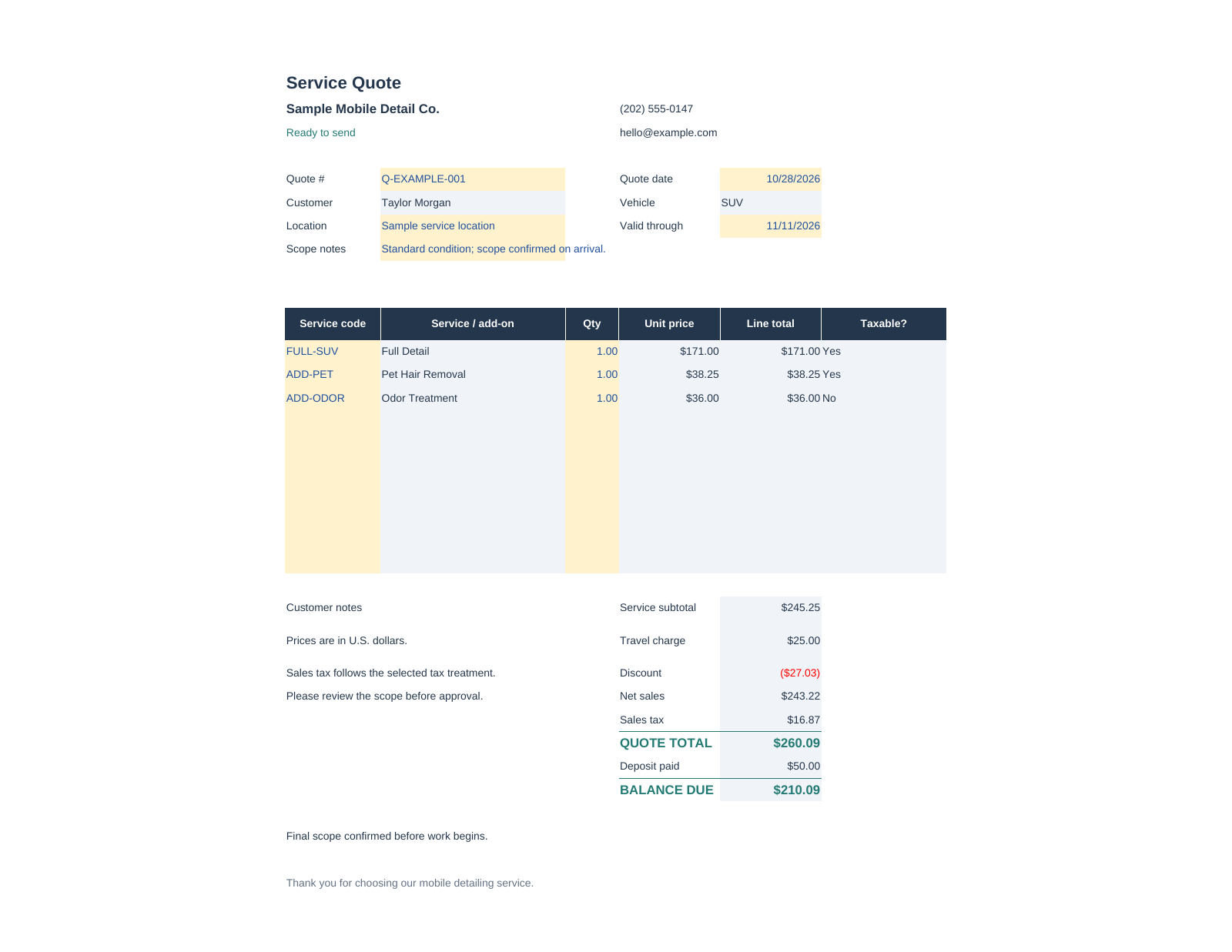
Fictional example data. Select the image to inspect it.
Example workbook
Blank-cost workbook
Nine-page English guide
A connected desktop spreadsheet workflow for independent detailers who want to understand their costs, prepare quotes, and review job results.
In preview. Sales are not open.
Compatibility and buyer delivery are being finalized.
Desktop XLSX files. Native Microsoft Excel testing is pending. Google Sheets conversion requires additional setup. Jobs are recorded manually.
No physical product, software subscription, booking service, or payment processing is included.
Six connected worksheets.
Two workbooks so you can learn, then make it your own.
Enter business details and your own labor, travel, overhead, pricing, and tax assumptions.
Build up to 40 service/vehicle combinations. Compare suggested prices using markup or gross margin.
Prepare up to 10 service lines. A customer-facing print area excludes internal profit calculations.
Manually record up to 200 jobs with actual revenue, costs, and collections.
Keep up to 200 customer records with IDs used across the workbook.
Review monthly and vehicle summaries, including profit after the overhead you recorded.
Amber cells are editable inputs.
Blue-grey cells show the calculated results.

Actual example workbook preview. Fictional inputs and amounts. Scroll horizontally to inspect more columns.
Version 1.0.1. Two workbooks, an English guide, and practical delivery notes.
File inventory only. Paid originals stay outside this preview.
| File | Purpose |
|---|---|
| Mobile_Detailing_Toolkit_Example.xlsx | Fictional example; six connected worksheets. |
| Mobile_Detailing_Toolkit_Blank.xlsx | Blank cost inputs; review and replace remaining service names. |
| Mobile_Detailing_Toolkit_User_Guide.pdf | Nine-page American English US Letter operating guide. |
| PRINTING_AND_COMPATIBILITY_ADDENDUM.md | Updated printing instructions and tested software scope. |
| READ_ME_FIRST.md | Unzip, learn, copy, edit, print, and record workflow. |
| BUYER_LICENSE_DRAFT.md | Proposed one-business internal use; completed quotes may be shared. |
| VERSION_NOTES.md | v1.0.1 changes and known limits. |
| SHA256SUMS.txt | File integrity checksums. |
v1.0.1, November 13, 2026: missing business names block quote readiness; ID matching treats *, ?, and ~ literally. Record print ranges include the final reserved row. Actual LibreOffice verification covered 60 scenarios and 300 assertions.
All record reports use US Letter landscape and span multiple pages. The dashboard exported as five pages; some repeated notes are partial on continuation pages. Long free-text identifiers can exceed column widths. Review print previews and select populated records for shorter reports.
Native Microsoft Excel and updated Google Sheets import have not been tested. Sheet protection is an accidental-edit aid, not encryption. One tax rate does not determine tax obligations. All example data is fictional.
Independent mobile detailers and small teams comfortable using a desktop spreadsheet and recording their own job data.
The macro-free XLSX files were recalculated and printed in LibreOfficeDev 26.8.0.0.alpha0. Native Microsoft Excel testing is pending. Google Sheets conversion needs dropdown and protection setup. A ready-to-copy Google buyer template is not included.
It prepares printable quotes and summarizes the job information you manually enter. Appointment booking, invoicing, payment processing, and automatic banking synchronization are not included.
It applies the single tax rate and taxable-service settings you enter. It does not determine state or local tax rules.
No. Reserved ranges cover 40 service/vehicle combinations, 10 quote lines, 200 customers, and 200 jobs. Automatic expansion is not included.
Sales are not open in this preview. A draft license proposes internal use by one purchasing business and sharing completed customer quotes; reusable templates may not be redistributed. Final seller terms, support, refunds, and protected downloads remain pending.